Advanced Settings
Configuring complex Taxes, Notifications, Geolocation tracking, and Retention rules.
Advanced Settings
The Settings abstraction allows administrators to fine-tune the behavior of their Organization.
Notifications (Email, Slack, SMS)
Under Settings > Notifications, you define how the platform communicates with your team and your buyers.
- SMTP Service: Configure your outbound mail server credentials (host, port, TLS). The gateway decrypts these credentials entirely on-the-fly when sending emails.
- Slack Webhooks: Receive real-time channel alerts for specific
payment.succeededorpayment.failedevent types. - Notification preferences: Choose which organization and portal events generate outbound email, Slack, or SMS traffic.
Document, email, Slack, and SMS templates are managed separately under Settings > Templates (/settings/templates), not on the Notifications page.
Templates
Under Settings > Templates, you can manage organization-scoped document templates and notification templates in one workspace. This includes document PDFs for invoices, pro forma documents, credit notes, and receipts, plus organization email, Slack, SMS, and supported portal-event templates. System-level portal notification templates used with system SMTP are managed separately under System > Templates by global administrators.
Template presentation controls such as logo placement, typography, page margins, section order, custom variables, source/export behavior, and PDF proofs live in Settings > Templates. Organization-level invoice data such as uploaded logo assets, payment-link creation behavior, wire-transfer bank data, and the default footer note remain in Settings > Invoicing so multiple templates can reuse the same business data without duplicating it.
For Designer mode, Advanced Source, VAT breakdown variables including VATBase, template imports/exports, revisions, PDF refresh behavior, and defaults, see Templates.
Invoicing
Under Settings > Invoicing, organizations configure two independent document-number layouts: one for invoices and one for credit notes.
- Each layout controls prefix, optional middle text, suffix, start number, digit width, year basis, visible date detail, separator, and reset policy.
- Fiscal-year labels are derived by the backend from the issue date and the configured fiscal-year start month.
- Sites may override only the invoice and credit-note prefixes. They do not create their own sequence counters or fiscal/calendar rules.
- Active invoice sequence shows the next formatted invoice number, current calendar/fiscal bucket, legal timezone, and organization scope. After the first invoice in a bucket exists, administrators can make a reasoned, audited forward-only adjustment to continue after externally issued invoice numbers. The review and confirmation flow rejects backward moves and refreshes after concurrent allocations.
- The layout Starting number initializes a new sequence bucket. Use Set next invoice number for an already-active bucket; existing invoices are never renumbered.
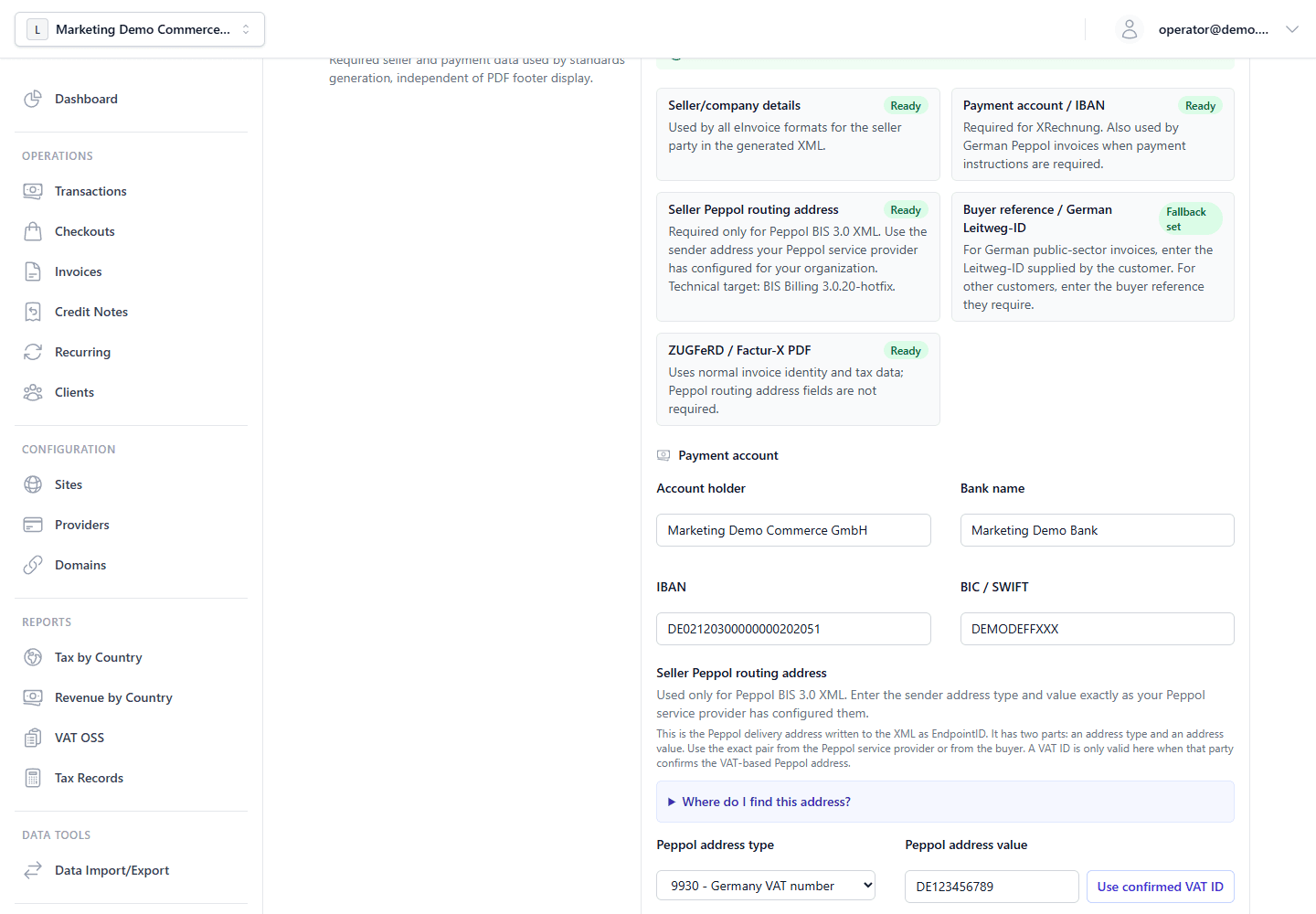
- Organization eInvoice readiness groups required data by format. Seller identity and tax basics are shared by all formats. XRechnung uses buyer reference / German Leitweg-ID guidance and requires an IBAN for credit-transfer payment instructions. Peppol BIS 3.0 XML uses seller and buyer Peppol routing addresses. ZUGFeRD / Factur-X does not use Peppol routing address fields.
- A Peppol routing address is the party identifier written to XML as
EndpointID. It is not automatically the VAT ID. Use a VAT-based scheme only when the Peppol service provider or trading partner confirms that exact scheme and value. Use GLN (0088) only when the party has supplied a GS1 Global Location Number. Use Leitweg-ID as Peppol scheme0204only when a German public-sector recipient confirms it as the Peppol receiver address.
The full API payload shape for these settings is documented in the Admin API reference (see Organization Settings on the Admin API page).
Data Retention & Geolocation
The platform includes organization-scoped retention controls to support your data minimization and lifecycle policies.
Data Retention
Under Settings > Retention, you can configure:
- Transaction Data Retention:
- Enable or disable automatic transaction-data cleanup.
- Set retention period in days (minimum
30, maximum2555/ ~7 years in UI).
- Customer Data Retention (per field category):
- IP Addresses
- Billing Address
- Shipping Address
- Customer Email
- Transaction Items
- Optional "retain country information" toggle
Enabled retention windows start at 1 day for supported customer-data
fields. Disable a field-specific cleanup rule when you do not want automated
cleanup for that field; statutory, invoice, tax, dispute, and legal-hold
records must still follow the applicable retention obligations.
[!IMPORTANT] Retention values should be aligned with your legal/accounting obligations. Some jurisdictions require minimum retention periods for financial records.
Geolocation
Under Settings > Geolocation (/settings/geolocation), administrators configure organization-wide IP lookup behavior:
- Enable or disable geolocation for the organization.
- Choose and prioritize lookup providers (for example MaxMind, IPData, IPAPI) and store provider credentials.
- Control whether raw IP addresses are stored and set IP retention days.
Sites can optionally override these settings per channel. Geolocation supports buyer-country detection for tax (for example when billing address is incomplete) and OSS evidence collection. It does not implement checkout jurisdiction block or allow-list policies.
The Tax Engine
The gateway provides an organization-scoped tax configuration that is reused by hosted checkout, transactions, draft invoices, recurring invoices, refunds, chargebacks, and reporting.
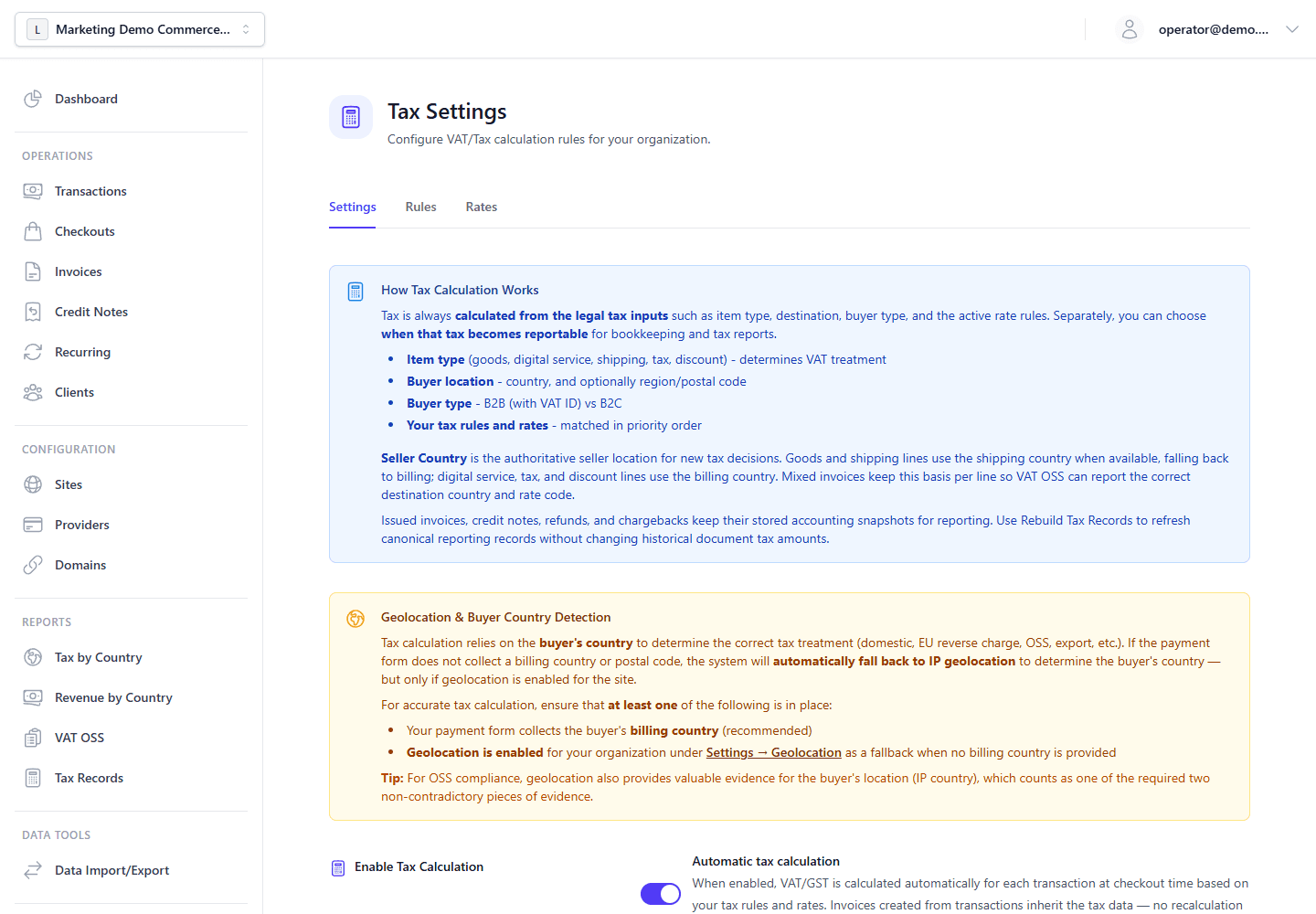
- Seller registration: Configure seller country, VAT/tax IDs, OSS/IOSS registration metadata, UK VAT settings, and small-business exemption references where applicable.
- Tax rates: Define effective-dated percentages such as
DE_STANDARD. Future rates can be added ahead of time and are resolved by the transaction or invoice tax-point timestamp. - Tax rules: Connect rates to seller country, buyer country, buyer type, supply type, priority, and tax treatment such as
standard,reverse_charge,exempt,zero_rated,oss,export, oruk_vat. - Calculation behavior: Choose whether merchant prices normally include tax, the rounding method, and the tax recognition mode used for canonical tax records.
- VAT validation and OSS evidence: Enable VIES-backed EU VAT ID validation and strict OSS evidence checks when you want checkout to require non-conflicting buyer-location evidence.
Settings > Checkout stores organization defaults for billing visibility, VAT invoice mode, VAT ID validation (none, format, or vies), email and confirmation behavior, customer-risk-hold policy, and display toggles such as showTaxBreakdown, showOrderSummary, and invoiceDownloadEnabled. Sites can override most of these per channel.
Customer risk holds are separate from dispute accounting. A lost or accepted dispute is a final merchant-loss outcome; it does not by itself remain an unresolved checkout blocker. If the organization enables customer risk holds, the gateway can either block future checkout attempts or allow only safe bank-transfer methods for that customer.
On the hosted checkout page today, PaymentForm applies billing and VAT settings from the effective checkout settings (billingDetailsMode, billingFieldModes, vatInvoiceMode, vatIdValidation). The display toggles showTaxBreakdown, showOrderSummary, and invoiceDownloadEnabled are persisted in admin but are not yet wired to the main-frontend checkout UI; the page always shows the compact order summary (reference, invoice number, total) and derives its tax note from tax-preview/session totals rather than showTaxBreakdown.
VAT ID validation mode is still gated by Settings > Tax, so checkout cannot show VIES-backed treatment when tax settings do not allow it.
For EU-focused merchants, automatic tax calculation should normally be paired with tax included in price and OSS registration when the merchant is registered for OSS. The seller country is the authoritative origin country for new calculations. Goods and shipping lines use the shipping destination when available, while digital service, tax, and discount lines use the billing country, so mixed baskets can intentionally choose different VAT rate codes per line.
Tax-rule rate selection depends on the treatment. standard and uk_vat rules use an explicit configured VAT rate code. oss rules resolve the destination VAT rate from the buyer country at calculation time. reverse_charge, exempt, export, and zero_rated rules do not require a configured rate code.
The Rebuild Tax Records action repairs canonical reporting records from stored source snapshots. It preserves issued invoice and credit-note history instead of applying current rules to old legal documents. Use it after migrations or data repair when Tax by country, Revenue by country, or VAT OSS needs complete canonical tax_records.
Reporting and API: Tax by country, revenue by country, and VAT OSS filings in the Admin Panel are backed by canonical tax records and report endpoints (see Invoicing & Tax architecture and the Tax Management / Tax records tables in the Admin API). Programmatic rate maintenance includes POST /api/v1/tax-rates/replace-defaults (scoped tax_rate:execute), which syncs managed official default VAT percentage rates while preserving custom rates.